Report Queue
The Report Queue shows all reports that are waiting to be processed or currently being generated. This is where you monitor the progress of your report requests.
Accessing the Queue
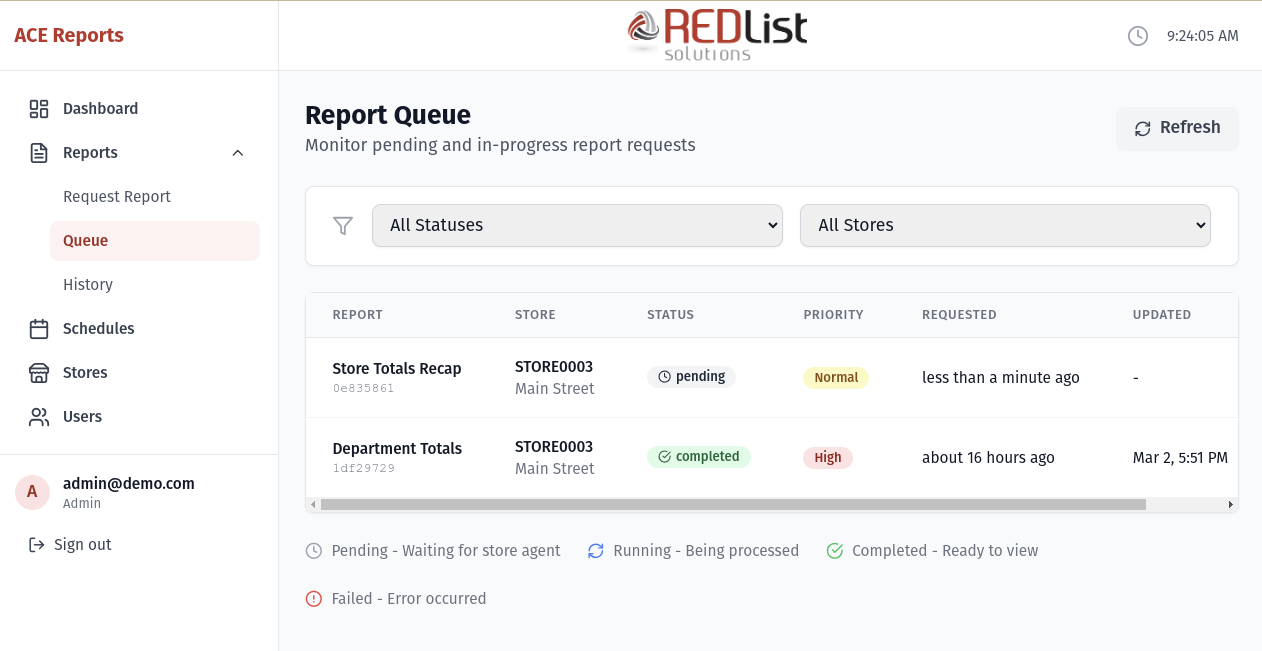
To view the Report Queue:
- Click "Reports" in the sidebar
- Click "Queue"
You'll also be automatically taken here after requesting a new report.
Understanding Report Status
Each report in the queue has a status indicator:
| Status | What It Means |
|---|---|
| pending | The report is waiting for a store agent to pick it up. If the store is offline, it will stay pending until the store comes online. |
| assigned | A store agent has claimed this report and is preparing to generate it. |
| running | The report is actively being generated by the store's ACE system. |
| completed | The report is finished and ready to view. It will move to History. |
| failed | Something went wrong. Check the error message for details. |
Queue Information
For each report in the queue, you'll see:
- Report Name - The type of report requested
- Store - Which store the report is for
- Status - Current processing status
- Requested - When the report was requested (e.g., "2 minutes ago")
- Requested By - Who submitted the request
Auto-Refresh
The Queue page automatically refreshes every few seconds, so you'll see status changes in real-time. You can also click the "Refresh" button to manually update.
Canceling a Report
If a report is still pending (not yet picked up by a store), you can cancel it:
- Find the report in the queue
- Click the cancel button (X icon) in the Actions column
- Confirm the cancellation
When Reports Complete
When a report finishes successfully:
- Its status changes to completed
- It moves from the Queue to Report History
- You can click on it to view the report contents
Failed Reports
If a report fails, you'll see a failed status. Common reasons include:
- No data for period - The store had no transactions for the selected time period
- Connection timeout - The store agent lost connection during processing
- ACE error - An issue with the ACE system at the store
If a report fails, you can:
- Check the error message for details
- Verify the store is online
- Try requesting the report again
Stuck Reports
If a report stays "assigned" for more than 10 minutes, the system will automatically mark it as failed. This usually means the store agent encountered an issue.
In this case:
- Check if the store is still online on the Dashboard
- Try requesting the report again
- If issues persist, contact your administrator